Showing posts with label Fairy. Show all posts

Tuesday, February 15, 2011

Green Fantasy (3 Column) FREE LAYOUT


GREEN FANTASY
3 Column / Free Layout
To Get this layout for your blog, Click HERE

INSTRUCTIONS TO INSTALL TEMPLATE: 
To Load the new template to your blog.
1. Go to Layout, and click Edit HTML.
2. Delete everything in the template box so it's completely blank.
3. Paste the new template code into your template box.
4. Hit the Preview button to check out your new look.
5. Click the Save button.

Misted Tube by Peaches Truly Scrumptious Retreat
Thank you for the beautiful tube to make this fantastical layout! Its gorgeous Peaches!

Tuesday, January 25, 2011

Nod To Dreams (3 Column) FREE LAYOUT


NOD TO DREAMS
3 Column / Free Layout
To Get this layout for your blog, Click HERE

INSTRUCTIONS TO INSTALL TEMPLATE: 
To Load the new template to your blog.
1. Go to Layout, and click Edit HTML.
2. Delete everything in the template box so it's completely blank.
3. Paste the new template code into your template box.
4. Hit the Preview button to check out your new look.
5. Click the Save button.

Saturday, December 25, 2010

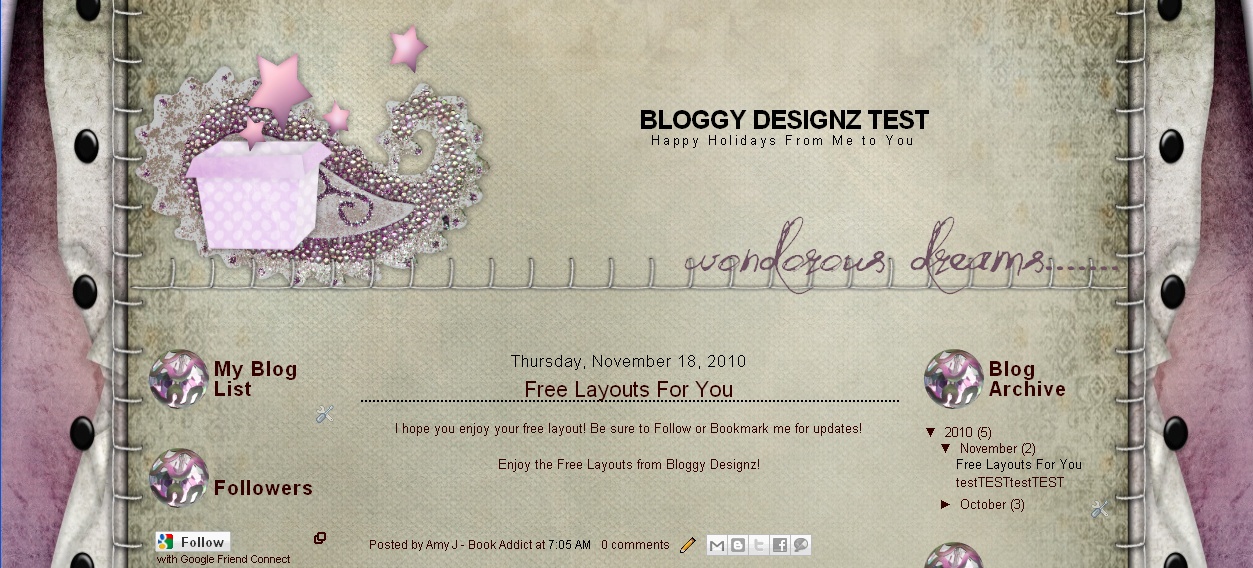
Wonderous Dreams (3 Column) FREE LAYOUT


WONDEROUS DREAMS
3 Column / Free Layout
To Get this layout for your blog, Click HERE

INSTRUCTIONS TO INSTALL TEMPLATE: 
To Load the new template to your blog.
1. Go to Layout, and click Edit HTML.
2. Delete everything in the template box so it's completely blank.
3. Paste the new template code into your template box.
4. Hit the Preview button to check out your new look.
5. Click the Save button.

Wednesday, December 22, 2010

Fantasy Forrest (3 Column) FREE LAYOUT


FANTASY FORREST
3 Column / Free Layout
To Get this layout for your blog, Click HERE

INSTRUCTIONS TO INSTALL TEMPLATE: 
To Load the new template to your blog.
1. Go to Layout, and click Edit HTML.
2. Delete everything in the template box so it's completely blank.
3. Paste the new template code into your template box.
4. Hit the Preview button to check out your new look.
5. Click the Save button.

Tuesday, December 21, 2010

Spring Fantasy (3 Column) FREE LAYOUT


SPRING FANTASY
3 Column / Free Layout
To Get this layout for your blog, Click HERE

INSTRUCTIONS TO INSTALL TEMPLATE: 
To Load the new template to your blog.
1. Go to Layout, and click Edit HTML.
2. Delete everything in the template box so it's completely blank.
3. Paste the new template code into your template box.
4. Hit the Preview button to check out your new look.
5. Click the Save button.

Wednesday, December 8, 2010

Dreamy Nights (3 Column) FREE LAYOUT


DREAMY NIGHTS
3 Column / Free Layout
To Get this layout for your blog, Click HERE

INSTRUCTIONS TO INSTALL TEMPLATE: 
To Load the new template to your blog.
1. Go to Layout, and click Edit HTML.
2. Delete everything in the template box so it's completely blank.
3. Paste the new template code into your template box.
4. Hit the Preview button to check out your new look.
5. Click the Save button.

Saturday, December 4, 2010

Tooth Fairy (3 Column) FREE LAYOUT


TOOTH FAIRY
3 Column / Free Layout
To Get this layout for your blog, Click HERE

INSTRUCTIONS TO INSTALL TEMPLATE: 

To Load the new template to your blog.
1. Go to Layout, and click Edit HTML.
2. Delete everything in the template box so it's completely blank.
3. Paste the new template code into your template box.
4. Hit the Preview button to check out your new look.
5. Click the Save button.

Monday, November 29, 2010

Relaxing Moment (3 Column) FREE LAYOUT


RELAXING MOMENT
3 Column / Free Layout
To Get this layout for your blog, Click HERE

INSTRUCTIONS TO INSTALL TEMPLATE: 

To Load the new template to your blog.
1. Go to Layout, and click Edit HTML.
2. Delete everything in the template box so it's completely blank.
3. Paste the new template code into your template box.
4. Hit the Preview button to check out your new look.
5. Click the Save button.

Thursday, November 11, 2010

Moments Tag


Moments Tag
Just click on image and save to your computer. Upload it to your blog.

Monday, November 1, 2010

Woodland Fairy (3 Column) FREE LAYOUT


WOODLAND FAIRY
3 Column / Free Layout

To Get this layout for your blog, Click HERE

INSTRUCTIONS TO INSTALL TEMPLATE: 

To Load the new template to your blog.
1. Go to Layout, and click Edit HTML.
2. Delete everything in the template box so it's completely blank.
3. Paste the new template code into your template box.
4. Hit the Preview button to check out your new look.
5. Click the Save button.

Friday, October 22, 2010

Happy Fall Fairy Tag and Button


Happy Fall Tag
Just click on image and save to your computer. Upload it to your blog.


Happy Fall Button
Just click on image and save to your computer. Upload it to your blog.
 

Never Grow Up Tag (Tinkerbell Inspired)


Never Grow Up Tinkerbell Tag
Just click on image and save to your computer. Upload it to your blog.

Thursday, October 21, 2010

Fairy Tale Life


Fairy Tale Life
Just click on image and save to your computer. Upload it to your blog.

Tuesday, October 19, 2010

Modern Strawberry Shortcake Tag


Modern Strawberry Shortcake Tag
Just click on image and save to your computer. Upload it to your blog.

Wednesday, October 13, 2010

Fairy Dreams (2 or 3 column)


2 COLUMN:
background-image:url(http://i461.photobucket.com/albums/qq331/djsfoxylady/designs001.png);background-position: center; background-repeat:no-repeat; background-attachment: fixed;


HEADER:
Please check the box for "Shrink to fit" for 2 column blogs